Cables
USB-C cables explained: speed, power and Thunderbolt
Every USB-C cable has the same plug, but they don’t all do the same job. Here’s how to tell a charge-only cable from a 40Gb/s Thunderbolt cable, and which one your device needs.
Checked against sources 15 October 2026
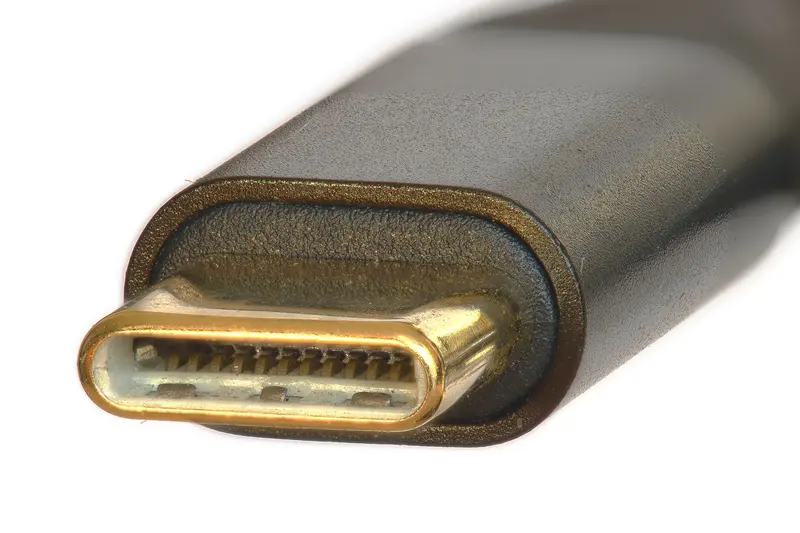
The plug is not the cable
The USB standards body, USB-IF, puts it bluntly in its packaging guidelines: “USB Type-C is not USB 3.2 or USB4” and “USB Type-C is not USB Power Delivery”. USB-C only describes the oval connector. Two USB-C cables can look the same and still behave very differently. That’s why a cable that charges your iPhone happily can make an external SSD crawl, or leave a monitor blank.
Every USB-C cable has two ratings worth knowing:
- Power: how many watts it’s built to carry, usually 60W or 240W.
- Data: how fast it moves files and whether it can carry a video signal.
Data speeds, slowest to fastest
| Label you’ll see | Top speed | Typical use |
|---|---|---|
| USB 2 (Hi-Speed) | 480Mb/s | Charging, keyboards, syncing a phone |
| USB 5Gbps / 10Gbps / 20Gbps (the old “USB 3.x” names) | 5 / 10 / 20Gb/s | External SSDs, hubs, iPhone Pro file transfer |
| USB 40Gbps (USB4) | 40Gb/s | Docks, fast SSDs, displays |
| USB 80Gbps (USB4 Version 2.0) | 80Gb/s | The newest docks and drives |
| Thunderbolt 3 / 4 | 40Gb/s | Mac docks, displays, fast storage |
| Thunderbolt 5 | 80Gb/s (up to 120Gb/s with Bandwidth Boost) | Recent MacBook Pro, Mac mini and Mac Studio |
USB-IF now asks makers to label speed in plain numbers (“USB 10Gbps”, “USB 40Gbps”) instead of spec names like “USB 3.2 Gen 2”. You’ll still see both on Amazon listings. When two devices with different speeds are connected, they run at the fastest speed both ends support, and that includes the cable. A USB 2 cable “physically cannot support USB 3.2 nor USB4 signals”, according to USB-IF.
Power: 60W or 240W
USB Power Delivery (USB PD) is how a USB-C charger and your device agree on how much power to send. Up to 2021 it topped out at 100W. The USB PD 3.1 update raised it to 240W over a “full-featured” USB-C cable.
- A 60W cable is enough for iPhones and iPads, including iPhone 18 Pro. Apple’s spec page asks for a “60W-capable” cable for its fastest wired charging.
- A 240W cable is the safe choice for a MacBook Pro. Apple lists its 240W USB-C Charge Cable for fast-charging the 16-inch MacBook Pro (Nov 2023 or later) over USB-C.
Apple also warns that some USB-C cables “only support data transfer and won’t charge your Mac”. If a Mac won’t charge, try another cable first.
Thunderbolt is USB-C with higher minimums
Thunderbolt uses the same USB-C plug. Intel says Thunderbolt certification “mandates higher minimum performance and capabilities for cables, PCs, and accessories”. Thunderbolt 4 guarantees 40Gb/s. Thunderbolt 5 doubles that to 80Gb/s and can boost one direction to 120Gb/s for video-heavy work.
On a Mac, Apple says Thunderbolt ports take both Thunderbolt and ordinary USB-C cables. Plain USB-C ports, such as the ones on MacBook Neo and the front of recent Mac mini models, take USB-C cables. Each Mac’s ports are listed on its device page.
Spotting a good cable
- Logo on the plug: certified USB-C to USB-C cables must show a USB-IF logo with both speed and power, such as “20Gbps/60W”. Charge-only USB 2 cables show just the wattage.
- Thunderbolt logo: Apple’s Thunderbolt cables have the Thunderbolt symbol on each connector. Its plain charge cable doesn’t.
- Apple’s own cables: the 240W USB-C Charge Cable carries 240W but only “transfers data at USB 2 rates”. The Thunderbolt 5 (USB-C) Pro Cable does 120Gb/s, DisplayPort 2.1 video and 240W charging.
Which cable for which job?
- Charging an iPhone, iPad or AirPods: any decent USB-C cable rated 60W. Lightning devices need a USB-C to Lightning cable.
- Charging a MacBook: a 100W or 240W cable. Larger MacBook Pros need 240W.
- iPhone Pro to a USB 3 drive or camera workflow: Apple says the cable in the iPhone box is USB 2 only. Use “a compliant USB 3 cable that supports 10 Gbit/s”.
- Dock, display or fast SSD on a Mac: use the cable that came with the accessory, or a USB4 or Thunderbolt cable.
Browse cables by device, or see the glossary for the jargon.
Sources checked 15 October 2026
- USB-IF – USB Type-C and USB 2.0 Type-C cable and connector language guidelines (PDF) usb.org
- USB-IF – USB Data Performance Language Usage Guidelines (PDF) usb.org
- USB-IF – USB4 usb.org
- USB-IF – USB Charger (USB Power Delivery) usb.org
- USB-IF – USB Type-C Cable Logo Usage Guidelines (PDF) usb.org
- Intel – Thunderbolt technology overview intel.com
- Apple Support – Use USB-C cables with Mac support.apple.com
- Apple Support – About the Apple Thunderbolt 3 (USB-C) Cable support.apple.com
- Apple Support – Charge and connect with the USB-C connector on your iPhone support.apple.com
- Apple Support – If your USB-C power adapter isn’t charging your Mac laptop support.apple.com
- Apple (UK) – Thunderbolt 5 (USB-C) Pro Cable (1m) apple.com
- Apple (UK) – 240W USB-C Charge Cable (2m) apple.com